From Model to Material List: Automate Your Bill of Materials with hsbBomLink
From model to material list: automate your Bill of Materials with hsbBomLink
Every offsite timber project eventually reaches the same question: What exactly do we need to order?
The answer goes far beyond the timber visible in the model. Boards, fasteners, membranes, sealing products, electrical components, site materials and many other items can all be part of the final Bill of Materials (BOM).
When that information has to be collected manually, the process quickly becomes time-consuming. Quantities need to be calculated, article numbers copied into other systems, materials that are not explicitly modelled need to be estimated, and different people may evaluate the same project in different ways.
hsbBomLink turns that process into an automated, repeatable workflow driven directly by your project data, your article catalogue and your own company rules.
For offsite timber manufacturers using hsbDesign and hsbMake, that means a stronger connection between what has been designed, what needs to be purchased and the data that continues into production.
What is hsbBomLink?
hsbBomLink is a hybrid hsbcad component designed to transform model information into an accurate, structured Bill of Materials.
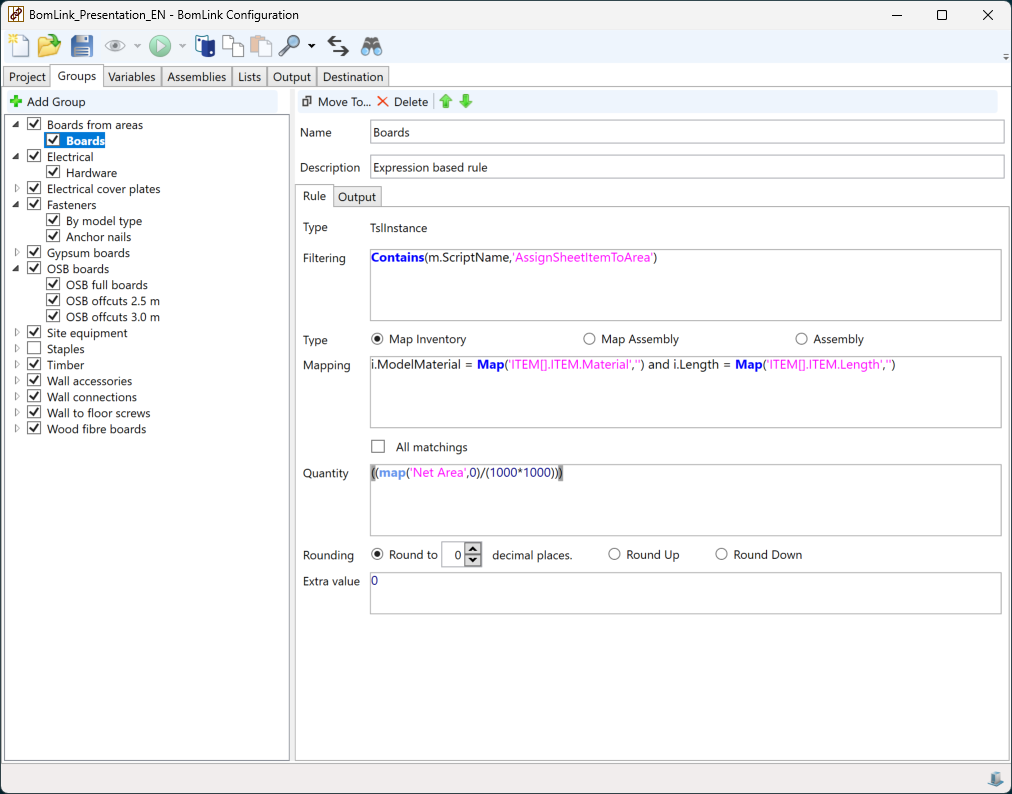
Instead of rebuilding a material list manually, hsbBomLink reads the project data and applies predefined rules to determine:
Which model elements should be included;
Which catalogue article each element corresponds to;
How the required quantity should be calculated;
Whether additional materials need to be derived from the model;
And how the final information should be formatted for other systems.
The result is not simply a list of everything drawn in the model. It is a company-specific BOM generated using the logic your business actually works with.
Turn your own article catalogue into part of the design-to-production workflow
Every manufacturer has its own materials, article numbers, suppliers, units, pack quantities and purchasing logic. hsbBomLink is built around that reality.
Your existing article catalogue can become the reference used to match model elements with the materials your company actually purchases. Catalogue information can include article numbers, descriptions, supplier information, prices, packaging quantities and other relevant data.
Rather than forcing your organisation to adapt to a generic material structure, hsbBomLink allows the BOM process to work with your catalogue, your rules and your required output.
Once configured, those rules and inventory settings can be reused across projects, helping turn company knowledge into a consistent standard rather than something that has to be recreated project by project.
Calculate more than what is explicitly modelled
One of the biggest differences between a model quantity export and a true material planning workflow is what happens to materials that are not directly drawn. A timber model might contain a wall, for example, without individually modelling every screw, strip of sealing material or bag of mortar required to build it.
hsbBomLink can derive those quantities from the information already available in the model. Depending on your company's rules, this can include calculations such as:
Fasteners based on geometry. The required number of wall-to-floor screws can be calculated from wall length and a defined screw spacing.
Wall accessories. Materials such as sealing strips, vapour barriers or mortar can be calculated from properties such as wall length and frame dimensions.
Connection-specific materials. Rules can evaluate how building elements connect and add materials only when certain conditions are met.
Electrical accessories. Modelled devices can be evaluated to determine the appropriate related components, such as the correct cover plate for the number of devices in an electrical box.
This means the BOM can represent more of what purchasing and production actually need, not only what happens to be individually modelled.
Make material planning stock-aware
Material planning is not only about counting components. It is also about understanding how the required material relates to what your company can actually purchase.
hsbBomLink rules can support stock-aware calculations such as timber cut optimisation against available stock lengths. For example, timber elements from the model can be evaluated against predefined stock sizes, while non-stock dimensions can be identified for special ordering.
Boards can also be evaluated differently depending on how they appear in the model. Full boards may be counted directly, while offcuts or area-based materials can be converted into the appropriate board equivalents.
The objective is simple: move from theoretical model quantities towards information that is more useful for real purchasing decisions.
Reduce manual re-entry between design and purchasing
A model may already contain much of the information your purchasing and production teams need. The challenge is getting that information into the right structure.
hsbBomLink connects model elements with your catalogue article data automatically, reducing the need to manually retype information such as article numbers between systems.
The enriched article information can also be written back to the project model. That creates an important round trip: Model → hsbBomLink → article data → model
Once article numbers, descriptions, units and other catalogue information are associated with the relevant elements, that data can continue downstream into workflows such as drawings, labels, hsbMake and CNC-related production data.
Instead of different departments recreating the same information, the model becomes a more useful source of connected production data.
Create the BOM your systems actually need
There is rarely one universal material-list format across an offsite construction business. Purchasing may want an Excel file. An ERP system may need a structured import. Production may require a hierarchical BOM organised by module, assembly or workstation.
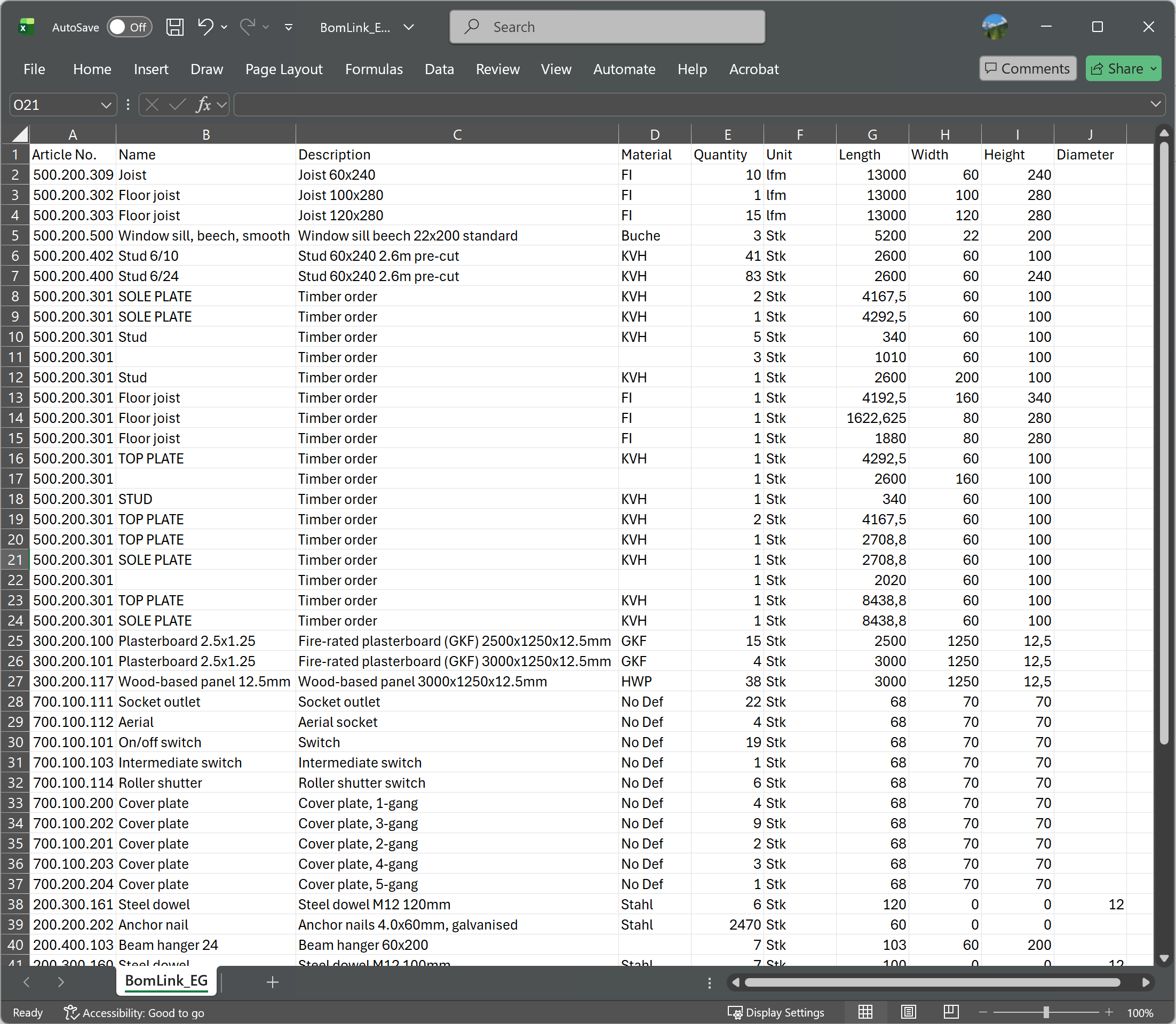
hsbBomLink can generate different outputs from the same project evaluation, including formats such as Excel, CSV, XML and database outputs.
That makes it possible to create:
Flat material lists for purchasing;
Formatted Excel lists using your company's layout;
Data for ERP or purchasing-system imports;
Structured hierarchical BOMs;
Database outputs;
Printable reports;
And multiple outputs from a single run.
This allows the same project information to serve different parts of the organisation without manually rebuilding the material list for each destination.
Test the rules before relying on the output
Automation only creates value when teams can understand and verify what it is doing. hsbBomLink therefore provides tools to inspect both the model information and the rules applied to it.
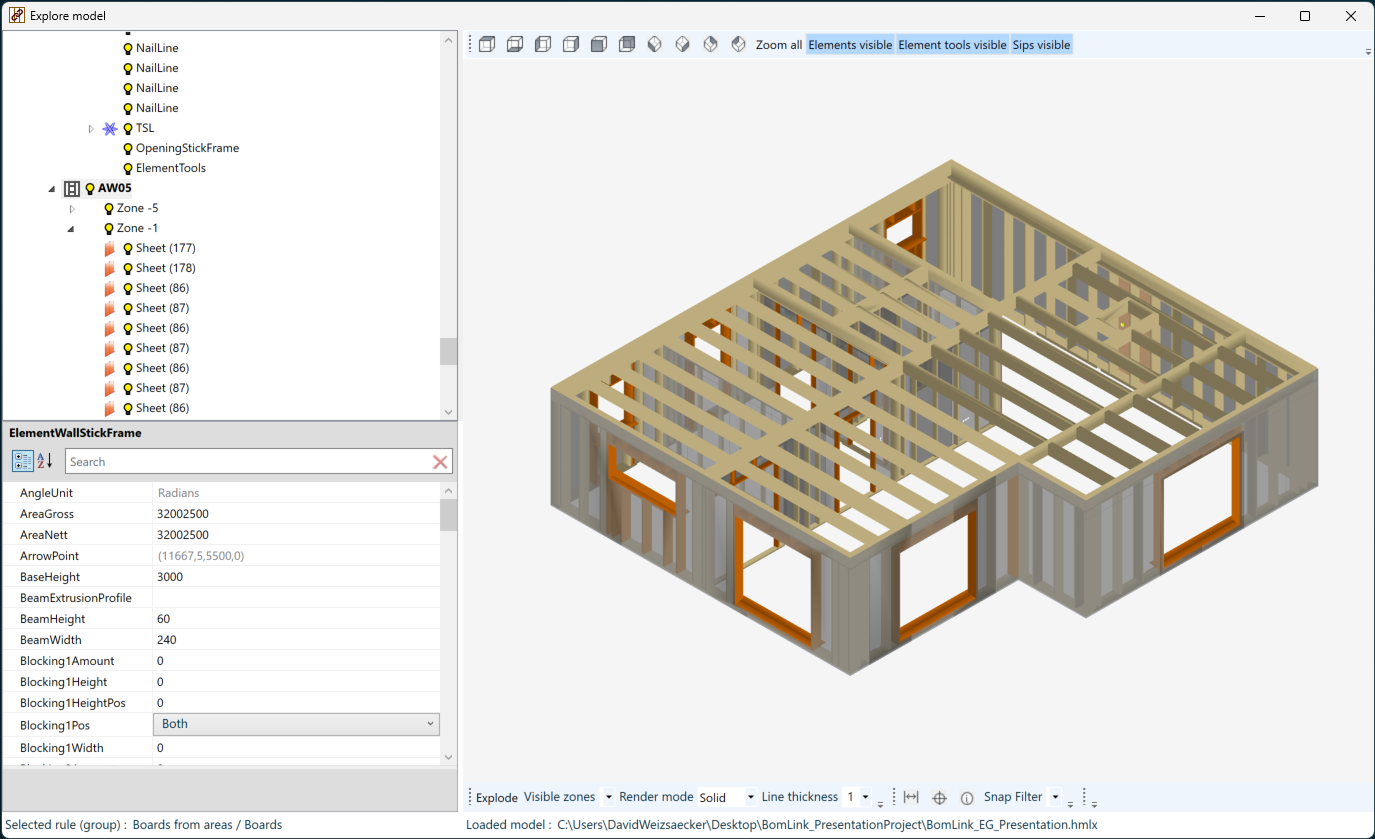
The model explorer lets users browse the loaded model in 3D, inspect individual elements and review the properties used by the BOM rules. Individual rules can also be previewed before the final output is generated. This makes it possible to see exactly which elements a rule captures, which model values are being evaluated and how the resulting quantities are produced.
For businesses introducing more automation into material planning, that traceability is important: company logic can be checked and refined before it becomes part of the standard workflow.
Configure the logic once. Apply it project after project.
The real value of BOM automation becomes visible beyond a single project.
Your company's rules can define how timber, boards, fasteners, accessories, assemblies and other materials should be evaluated. Once those rules are established, they can be reused. That helps turn individual knowledge into a repeatable company process. Instead of one estimator calculating a project one way and another colleague using a different method, the same logic can be applied consistently across projects.
For growing offsite timber businesses, that creates a stronger foundation for scaling design and production without scaling the amount of repetitive manual data processing at the same rate.
Connect design, purchasing and production around the same data
Offsite construction depends on information moving accurately between teams.
Design knows what has been modelled. Purchasing needs to know what must be ordered. Production needs the right material and article information when the project reaches the factory. hsbBomLink helps connect those stages by transforming design data into information the rest of the business can use.
The result is a workflow in which: the model defines the project → company rules evaluate it → the article catalogue enriches it → the BOM supplies the next system.
That means less manual material take-off, less repetitive data entry and a more consistent way to turn an hsbDesign project into purchasing and production information.
See what hsbBomLink can do with your own project
The best way to evaluate BOM automation is not with a generic material list. It is with your own data.
A typical first step is to bring together 3 things:
Your article catalogue: for example, an export from your ERP or purchasing system.
Your required output: including the lists, formats and systems that need the information.
One of your projects: so the rules can be evaluated against the way your company actually designs and builds.
From there, hsbBomLink can be configured around your materials, your processes and your company standards.
hsbcad verwendet Cookies, um die Erfahrung der Website-Besucher kontinuierlich zu verbessern. Zum einen können Cookies diese Erfahrung direkt verbessern, z. B. indem sie sich die Wahl der Sprache oder andere spezifische Einstellungen merken. Darüber hinaus liefern bestimmte Cookies hsbcad statistische Informationen über die Nutzung ihrer Website und ermöglichen es ihr so indirekt, die Präferenzen der Besucher besser zu erfüllen, indem sie sich entsprechend anpassen. Schließlich können Cookies bestimmte Anwendungen von Drittanbietern, wie z. B. Verbindungen zu sozialen Netzwerken, erleichtern und Ihnen somit die Nutzung bestimmter zusätzlicher Funktionen ermöglichen, z. B. etwas auf Facebook "mögen", etwas über Twitter "twittern" usw.
Was genau sind Cookies?
Cookies sind kleine Textdateien, die Ihr Browser auf Ihrem Computer installiert und die es der Website ermöglichen, Sie bei Ihrem Besuch zu erkennen. Sie bestehen aus einer eindeutigen Nummer und können Sie somit von anderen Besuchern unterscheiden, enthalten aber keine persönlichen Daten. Das bedeutet, dass hsbcad Sie anhand solcher Cookies weder persönlich identifizieren kann, noch Sie beim Besuch von Websites Dritter identifizieren kann.
Dank Cookies kann hsbcad zum Beispiel sicherstellen, dass die Informationen, die bei Ihrem nächsten Besuch auf der Website auf Ihrem Bildschirm erscheinen, auf Ihre Präferenzen abgestimmt sind. Mit Hilfe von Cookies kann hsbcad auch die beliebtesten Abschnitte seiner Website identifizieren, da sie hsbcad ermöglichen, zu erfahren, welche Seiten besucht werden und wie viel Zeit die Besucher auf diesen Seiten verbringen. Auf der Grundlage dieser aggregierten Daten kann hsbcad seine Website anpassen, um die Präferenzen der Besucher besser zu berücksichtigen und ein kundenorientierteres Erlebnis zu bieten. Schließlich können Cookies bestimmte Anwendungen von Drittanbietern, wie z. B. Verbindungen zu sozialen Mediennetzwerken, erleichtern.
Wie wir Ihre informierte Zustimmung erhalten
Wenn Sie die Website von hsbcad zum ersten Mal aufrufen, werden Sie aufgefordert, die Verwendung von Cookies zuzulassen oder abzulehnen, und es wird Ihnen ein Link zu dieser Cookie-Richtlinie für weitere Informationen angezeigt. Das Hinweisbanner wird bei zukünftigen Besuchen der Website nicht mehr auf Ihrem Bildschirm erscheinen, aber die Möglichkeit, Cookies zu entfernen oder Ihre Zustimmung zur Verwendung von Cookies insgesamt zu widerrufen, bleibt Ihnen über die Einstellungen Ihres Internetbrowsers offen (siehe unten unter "Widerspruch").
Einspruch
Es ist möglich, Ihren Browser so zu konfigurieren, dass er die Verwendung von Cookies zulässt oder ablehnt oder Sie jedes Mal informiert, wenn ein Cookie gesendet wird. Da nicht alle Browser gleich sind, rät hsbcad Ihnen, das Hilfe-Menü Ihres Browsers zu konsultieren, um zu erfahren, wie Sie Cookies löschen und/oder Ihre Cookie-Einstellungen für die Zukunft (neu) anpassen können. Sie können Ihre Zustimmung auch widerrufen, indem Sie eine diesbezügliche E-Mail an info@hsbcad.com senden. Beachten Sie jedoch, dass die Deaktivierung von Cookies unter Umständen eine optimale Nutzung der Website verhindern kann. hsbcad tauscht keine Cookies mit Websites von Dritten oder externen Datenlieferanten aus, mit Ausnahme von Dritten, die direkt mit hsbcad zusammenarbeiten, um Website-Dienste zu erbringen.
Weitere Informationen zum Schutz Ihrer persönlichen Daten finden Sie in unserer Datenschutzrichtlinie.
Welche Daten werden für welche Zwecke gesammelt?
Wenn Sie die Website besuchen, kann hsbcad automatisch die folgenden technischen Informationen erheben (die Sie nicht identifizieren können): Ihr Betriebssystem und Ihren Browsertyp, den Domainnamen einer anderen Website, über die Sie auf die Website zugegriffen haben, den Zeitpunkt und die Dauer Ihres Besuchs, welche Seiten Sie besucht haben, usw.
Diese Daten werden ausschließlich für interne Zwecke verwendet, nämlich damit hsbcad allgemeine demographische Daten, Verhalten und Interessen untersuchen kann. Dadurch kann hsbcad die Website und ihre Anwendungen besser auf die verschiedenen Bedürfnisse und Wünsche ihrer Besucher abstimmen:
die Größe der Zielgruppe und das Nutzungsverhalten abschätzen;
speichern Informationen über Vorlieben und individuelle Interessen;
die Suche zu beschleunigen; und
Sie (anonym) zu erkennen, wenn Sie auf unsere Seite zurückkehren.
Es ist wichtig zu betonen, dass hsbcad die gesammelten Daten, abgesehen von der Speicherung Ihrer Einstellungen auf der Website, ausschließlich für Webstatistiken in Google Analytics verwendet, d.h. die Daten werden nur in aggregierter Form und ausschließlich für interne Zwecke verwendet. hsbcad sammelt keine persönlichen Informationen über seine Besucher und kann Sie anhand der gesammelten Daten nicht persönlich identifizieren.
Cookie-Zusammenfassung
Name
Domain
Inhalt und Zweck
Gültig
Funktionale Cookies
LtpaToken2
boip.int, register.boip.int, filing.boip.int
Verschlüsselter Authentifizierungs-Token für SSO (Single Sign On)
Dauer der Sitzung
JSESSIONID
boip.int, register.boip.int, filing.boip.int
Standard-Java-Cookie, , um den Browser mit einer Serversitzung zu verbinden. Jede Anfrage eines Benutzers wird auf demselben Clusterknoten verarbeitet
Dauer der Sitzung
bmbLanguage
register.boip.int
Einstellung der Benutzersprache
13 Monate
bmbOptionalColumns
register.boip.int
Spalten für Benutzereinstellungen
13 Monate
bmbItemsPerPage
register.boip.int
Ergebnisse der Benutzerpräferenzen pro Seite
13 Monate
bmbSortColumn
register.boip.int
Sortierreihenfolge der Benutzerpräferenz
13 Monate
bmbStartPage
register.boip.int
Startseite der Benutzereinstellungen
13 Monate
bmbFirstTradñmark-Mutation
register.boip.int
Benutzerpräferenz für die Anzeige von Mutationen
13 Monate
Nicht-funktionale Cookies
_utma
boip.int, filing.boip.int
Google Analytics Tracking-Cookie
2 Jahre
_utmb
boip.int, filing.boip.int
Google Analytics Tracking-Cookie
30 Minuten
_utmc
boip.int, filing.boip.int
Google Analytics Tracking-Cookie
Dauer der Sitzung
_utmz
boip.int, filing.boip.int
Google Analytics Tracking-Cookie
6 Monate
Datenschutzbestimmungen
Die vorliegende Datenschutzrichtlinie beschreibt, wie wir personenbezogene Daten, die Sie uns zur Verfügung stellen, verwenden. Sie kann von Zeit zu Zeit aktualisiert werden. Wir empfehlen Ihnen daher, diese Seite regelmäßig zu konsultieren, damit Sie sich über etwaige Änderungen informieren und entscheiden können, ob diese für Sie akzeptabel sind. Diese Richtlinie gilt für alle Website-Besucher und Nutzer von Diensten und Anwendungen sowie für alle Zugriffsmittel, einschließlich, aber nicht beschränkt auf Desktop- und Laptop-Computer, öffentliche Internet-Konsolen und mobile Geräte. Durch die Übermittlung Ihrer persönlichen Daten über diese Website, Anwendung oder diesen Dienst bestätigen Sie ausdrücklich Ihr Einverständnis mit deren Nutzung gemäß dieser Datenschutzrichtlinie. Darüber hinaus gilt diese Datenschutzrichtlinie für andere Anwendungen, Verträge usw. Sollten Sie diesbezüglich Fragen oder Anmerkungen haben, wenden Sie sich bitte an unseren Kundenservice über das Kontaktmenü unserer Website oder über die Kontaktdaten unter den Ziffern 11 bzw. 16 unten. Die vorliegende Datenschutzerklärung wurde in Übereinstimmung mit der Verordnung (EU) 2016/679 des Europäischen Parlaments und des Rates vom 27. April 2016 zum Schutz natürlicher Personen bei der Verarbeitung personenbezogener Daten und zum freien Datenverkehr (nachfolgend: die "DSGVO") erstellt.
1. Definitionen
"hsbcad" oder "Wir": hsbcad GmbH, ein nach deutschem Recht gegründetes Unternehmen mit Sitz in der Schelmenhofstraße 1a, 87600 Kaufbeuren, Deutschland und der Handelsregisternummer HRB 12255 beim Registergericht Kempten.
"Nutzer": (a) Nutzer der Website oder der Anwendung, je nach Kontext gemeinsam oder einzeln, oder ggf. ein Lizenznehmer oder (a) Nutzer der Produkte oder Dienstleistungen von hsbCAD
"Website": die Websites, die über die folgenden primären URLs erreichbar sind: www.hsbcad.com sowie hsb academy
(https://hsbcad.academy/)
"Personenbezogene Daten": alle Informationen, die sich auf eine identifizierte oder identifizierbare natürliche Person beziehen.
"Verbundenes Unternehmen": ein Unternehmen, das Teil der hsb Gruppe ist und mit hsbcad verbunden ist, z.B. deren Tochterunternehmen.
2. Welche persönlichen Daten sammeln wir?
Auf bestimmten Seiten seiner Website oder Anwendungen erhebt hsbcad personenbezogene Daten über Sie. Bei den Daten, die hsbcad erhebt, handelt es sich um Daten wie Ihren Namen, Ihre Adresse, Telefonnummer, E-Mail-Adresse, Website, finanzielle Details, Benutzername, Passwort und Geschlecht, aber auch Ihre IP-Adresse, Browsertyp, Internetdienstanbieter, Gerätekennung, Zeitzoneneinstellungen, Browser-Plug-in-Typen und -Versionen sowie Informationen, die von Dritten gesammelt werden.
hsbcad erhebt, speichert und nutzt ferner Informationen über Ihre Besuche auf unserer Website und in unseren Anwendungen.
Wir erheben generell keine sensiblen personenbezogenen Daten. Zu den sensiblen personenbezogenen Daten gehören personenbezogene Daten, die Aufschluss über die rassische oder ethnische Herkunft einer Person, religiöse oder philosophische Überzeugungen oder Daten über die Gesundheit geben. Wenn wir sensible oder besondere personenbezogene Daten erheben, werden wir Sie zum Zeitpunkt der Erhebung um Ihre ausdrückliche Zustimmung zu der von uns vorgeschlagenen Verwendung dieser Informationen bitten.
3. Die Vertraulichkeit Ihrer persönlichen Daten
hsbcad behandelt Ihre personenbezogenen Daten in Übereinstimmung mit den Bestimmungen dieser Datenschutzrichtlinie und den für die Verarbeitung personenbezogener Daten geltenden gesetzlichen Verpflichtungen.
hsbcad nimmt den Schutz Ihrer persönlichen Daten sehr ernst und hat angemessene Maßnahmen ergriffen, um Ihre persönlichen Daten vor versehentlicher oder unrechtmäßiger Zerstörung, Verlust, Änderung, unberechtigter Offenlegung oder unberechtigtem Zugriff auf die übermittelten, gespeicherten oder anderweitig verarbeiteten persönlichen Daten zu schützen
hsbcad optimiert die Sicherheit Ihrer personenbezogenen Daten u.a. durch den Einsatz von Verschlüsselung, Firewalls und Passwortschutz, die Einholung vertraglicher Garantien von Dritten und die Beschränkung des Zugriffs auf Ihre personenbezogenen Daten(z.B. durch die Beschränkung des Zugriffs auf die Daten auf hsbcad-Mitarbeiter, die diese Daten für die unten beschriebenen Zwecke benötigen).
Wenn die Datenverarbeitung in unserem Auftrag durch einen Dritten erfolgt, haben wir die notwendigen Schritte unternommen, um sicherzustellen, dass angemessene Sicherheitsmaßnahmen getroffen werden, um einen unbefugten Zugriff auf Ihre persönlichen Daten oder deren Offenlegung zu verhindern.
Wenn Sie aufgefordert werden, sich als Benutzer zu registrieren, bittet hsbcad Sie, zum Schutz Ihrer persönlichen Daten beizutragen, indem Sie die Verwendung offensichtlicher Passwörter und/oder Benutzerkennungen vermeiden, Ihr Passwort regelmäßig ändern und sicherstellen, dass Sie Ihren Benutzernamen, Ihr Passwort oder andere Details nicht an andere weitergeben oder auf unsichere Weise speichern.
Alle persönlichen Daten, die Sie hsbcad zur Verfügung stellen, werden auf sicheren Servern gespeichert. Darüber hinaus werden hsbcad und seine Dienstleister stets ihr Möglichstes tun, um Ihre persönlichen Daten zu schützen. Die Übertragung von Informationen über das Internet kann jedoch nie vollständig sicher sein, und die Bereitstellung personenbezogener Daten erfolgt stets auf Ihr eigenes Risiko.
Für den Fall einer Datenschutzverletzung hat hsbcad Verfahren für den Umgang mit einer vermuteten Verletzung eingerichtet und wird Sie und alle zuständigen Aufsichtsbehörden über eine Verletzung informieren, sofern dies erforderlich ist.
Sollten Sie den Eindruck haben, dass Ihre persönlichen Daten nicht ausreichend geschützt sind oder Hinweise auf einen Missbrauch vorliegen, wenden Sie sich bitte an hsbcad über info@hsbcad.com.
4. Wie sammeln und speichern wir Ihre persönlichen Daten?
Wenn Sie einen registrierungspflichtigen Bereich der Website oder ggf. einer Anwendung oder eines Forums nutzen möchten, werden Sie aufgefordert, die entsprechenden Informationen auszufüllen. In diesem Fall macht hsbcad deutlich, dass sie Ihnen erst nach Übermittlung der angeforderten Informationen und der Akzeptanz der entsprechenden Richtlinien und Bedingungen vollen Zugang zu der Website, der Anwendung oder dem Forenbereich geben wird.
Darüber hinaus kann hsbcad Ihre persönlichen Daten erfassen, wenn Sie:
ein Online-Konto als Benutzer anlegen;
eine Bestellung oder Anfrage aufgeben;
einen Newsletter zu abonnieren;
an einem Wettbewerb, einer Tombola oder einer anderen Werbeaktion teilnehmen;
Fragebögen zu beantworten;
eine Beschwerde einreichen oder um Informationen bitten;
mit hsbcad per E-Mail, Telefon oder auf anderem Wege zu kommunizieren.
hsbcad kann personenbezogene Daten, die über die Website, die Anwendung oder das Forum erhoben wurden, mit personenbezogenen Daten, die hsbcad auf andere Weise zur Verfügung gestellt wurden, kombinieren. hsbcad wird es vermeiden, personenbezogene Daten zu erheben, die für die unten genannten Zwecke nicht relevant sind, und wird die Daten nicht länger aufbewahren, als es für diese Zwecke erforderlich ist, bzw. für den Zeitraum, der in einer Vereinbarung oder durch Gesetz festgelegt ist.
5. Für welche Zwecke verwenden wir Ihre persönlichen Daten?
hsbcad kann die von ihr erhobenen personenbezogenen Daten für die folgenden Zwecke ("die Zwecke") verwenden:
Rechtsgrundlage für die Verarbeitung(z. B. steuerliche und buchhalterische Zwecke, Geldwäscheprüfung usw.);
Sie als Nutzer auf der Website, der Anwendung oder dem Forum zu registrieren und die Dienste der Website oder der Anwendung zu betreiben (einschließlich der Bearbeitung von Anfragen oder Bitten um Informationen über hsbcad und seine Dienste) sowie Ihnen die effiziente Nutzung dieser Dienste zu ermöglichen( z. B. Blogs, Foren und Diskussionsseiten);
Sicherstellen, dass der Inhalt der Website für Sie auf die effektivste Weise für Sie und Ihren Computer dargestellt wird;
Bearbeitung von Anfragen oder Bestellungen, die über die Website aufgegeben werden;
Bearbeitung und Abwicklung von Beschwerden oder Anfragen;
den Markt sowie die Kunden, Produkte und Dienstleistungen von hsbcad zu erforschen und zu analysieren( z. B. indem wir Sie um Ihre Meinung zu den Produkten und Dienstleistungen von hsbcad bitten oder indem wir Sie bitten, eine Umfrage oder einen Fragebogen auszufüllen);
die hsbcad bei der Bewertung, Korrektur und Verbesserung ihrer Dienstleistungen unterstützen;
interne Ablage;
Marketing, einschließlich der Bereitstellung von Informationen, die Sie von hsbcad angefordert haben oder von denen hsbcad glaubt, dass sie für Sie von Interesse sein könnten, wenn Sie eingewilligt haben, zu solchen Zwecken kontaktiert zu werden (siehe Abschnitt unten über Direktmarketing);
Organisation von Wettbñwerben, Preisausschreiben und/oder anderen Werbeaktivitäten;
Personalbeschaffung (wenn Sie hsbcad diesbezüglich Informationen zur Verfügung gestellt haben); und
Benachrichtigung über bestimmte Änderungen an den hsbcad-Diensten.
Alle oben genannten Erwägungen gelten für die Verwendung Ihrer persönlichen Daten durch ein verbundenes Unternehmen für die Zwecke.
Im Falle der Berufung auf berechtigte Interessen wird hsbcad eine Abwägung vornehmen, um sicherzustellen, dass Ihre Interessen, Rechte und Freiheiten unsere berechtigten Interessen nicht überwiegen.
hsbcad wird Ihre personenbezogenen Daten nur für die Zwecke verwenden, für die wir sie erhoben haben, es sei denn, wir sind nach vernünftigem Ermessen der Ansicht, dass wir sie aus einem anderen Grund verwenden müssen und dieser Grund mit dem ursprünglichen Zweck vereinbar ist. Wenn wir Ihre personenbezogenen Daten für einen anderen Zweck verwenden müssen, werden wir Sie rechtzeitig darüber informieren und die Rechtsgrundlage erläutern, die uns dies erlaubt.
6. An wen geben wir Ihre persönlichen Daten weiter?
hsbcad wird Ihre persönlichen Daten nicht ohne Ihre Zustimmung an Dritte weitergeben, außer:
an Verbundene Unternehmen;
wenn eine solche Offenlegung erforderlich ist, um hsbcad-Mitarbeitern, -Vertretern, -Subunternehmern, -Lieferanten oder -Handelspartnern zu ermöglichen, eine Dienstleistung zu erbringen oder eine Aufgabe im Namen von hsbcad zu erfüllen (einschließlich der Bereitstellung von Marketingunterstützung, der Durchführung von Marktforschung oder der Erbringung von Kundendienstleistungen), Ihre Mitgliedschaft oder Lizenz zu verwalten, bestehende oder zukünftige Produkte oder Dienstleistungen zu liefern oder für die Teilnahme an Preisausschreiben, Wettbewerben und/oder anderen Werbeaktivitäten;
zu den professionellen Beratern von hsbcad;
dem Käufer oder potenziellen Käufer die Rechte und Pflichten von hsbcad in Bezug auf die Website;
wenn eine solche Offenlegung erforderlich ist, um die berechtigten Interessen von hsbcad oder seiner Kunden zu schützen, oder wenn sie gesetzlich vorgeschrieben oder zulässig ist.
Als Benutzer erkennen Sie an, dass alle Informationen, die Sie über ein Tool bereitstellen, das Informationen für andere Personen sichtbar macht( z. B. Blogs, Foren und Diskussionsseiten), von diesem Tool veröffentlicht werden. Es ist wichtig, dies im Hinterkopf zu behalten und gesunden Menschenverstand und Vorsicht walten zu lassen, wenn Sie Informationen über solche Tools bereitstellen.
Jede Weitergabe Ihrer personenbezogenen Daten durch hsbcad an einen sorgfältig ausgewählten Dritten oder an einen der in der obigen Liste genannten Dritten erfolgt stets in Übereinstimmung mit den geltenden Datenschutzgesetzen. hsbcad gewährleistet, dass Bestimmungen vorgesehen sind, die sicherstellen, dass Dritte Ihre personenbezogenen Daten nicht für andere Zwecke als die und entsprechend den Zwecken verwenden können, und dass diese Dritten die erforderlichen Sicherheitsmaßnahmen getroffen haben. Ggf. hat hsbcad mit diesen Drittverarbeitern Datenverarbeitungsverträge abgeschlossen, um den Schutz Ihrer personenbezogenen Daten zu gewährleisten.
Falls und wenn Sie sichere Online-Zahlungsseiten verwenden würden, wird Ihre Zahlung von einem Drittanbieter verarbeitet, der auf die sichere Online-Erfassung und Verarbeitung von Kredit-/Debitkartentransaktionen spezialisiert ist. Wenn Sie Fragen zu sicheren Transaktionen haben, kontaktieren Sie uns bitte.
7. Automatisierte Entscheidungsfindung
hsbcad trifft keine automatisierten Entscheidungen, die erhebliche Auswirkungen auf Personen haben könnten. Darunter sind Entscheidungen zu verstehen, die von Computerprogrammen oder -systemen ohne Zutun einer natürlichen Person(z.B. eines Mitarbeiters von hsbcad) getroffen werden.
8. Wie lange bewahren wir Ihre persönlichen Daten auf?
hsbcad wird Ihre personenbezogenen Daten nicht länger aufbewahren, als es für die Zwecke, für die sie erhoben und verarbeitet wurden, erforderlich ist.
Die Kriterien, die wir für die Aufbewahrung verschiedener Arten von personenbezogenen Daten verwenden, sind unter anderem die folgenden:
Gesetzliche und behördliche Anforderungen: Wir werden die Informationen so lange aufbewahren, wie es gesetzlich vorgeschrieben ist( z. B. Rechnungslegungsvorschriften)
Allgemeine Anfragen: Wir bewahren Ihre Daten so lange auf, wie es für die Beantwortung Ihrer Anfragen notwendig ist. Anschließend bewahren wir die Informationen für ein Jahr nach dem letzten Kontakt auf;
Direktmarketing: Informationen, die auf Direktmarketingzwecken basieren, werden nicht länger als ein Jahr nach dem letzten aktiven Kontakt aufbewahrt.
9. Grundsätze des Datenschutzes
Die hsbcad hält sich bei der Verarbeitung Ihrer personenbezogenen Daten an die folgenden Grundsätze:
Rechtmäßigkeit, Fairness und Transparenz: Daten müssen rechtmäßig, fair und auf transparente Weise verarbeitet werden.
Zweckbindung: Daten müssen für festgelegte, eindeutige und rechtmäßige Zwecke erhoben werden und dürfen nicht in einer Weise weiterverarbeitet werden, die mit diesen Zwecken unvereinbar ist.
Datenminimierung: Daten müssen angemessen, relevant und auf das beschränkt sein, was in Bezug auf die Zwecke, für die sie verarbeitet werden, notwendig ist.
Genauigkeit: Die Daten müssen genau sein und, falls erforderlich, auf dem neuesten Stand gehalten werden.
Speicherbegrenzung: Die Daten müssen in einer Form aufbewahrt werden, die die Identifizierung der betroffenen Personen ermöglicht, und zwar nicht länger, als es für die Zwecke, für die die personenbezogenen Daten verarbeitet werden, erforderlich ist.
Integrität und Vertraulichkeit: Die Daten müssen so verarbeitet werden, dass eine angemessene Sicherheit der personenbezogenen Daten gewährleistet ist, einschließlich des Schutzes vor unbefugter oder unrechtmäßiger Verarbeitung und vor unbeabsichtigtem Verlust, Zerstörung oder Beschädigung durch geeignete technische oder organisatorische Maßnahmen.
10. Direktmarketing
Auf Registrierungsseiten oder an anderer Stelle auf der betreffenden Website oder Anwendung werden Sie möglicherweise gefragt, ob Sie bestimmte Informationen per E-Mail und/oder Post erhalten möchten. Wenn Sie dies tun, erklären Sie sich damit einverstanden, dass hsbcad Ihre persönlichen Daten verwendet, um Ihnen Informationen über seine Produkte, Werbeaktivitäten und Sonderangebote sowie alle anderen Informationen über Produkte oder Dienstleistungen von hsbcad oder verbundenen Unternehmen zukommen zu lassen, die nach Ansicht von hsbcad für Sie von Interesse sein könnten. Auch wenn Sie eine solche Präferenz nicht angegeben haben, aber ein bestehender Kunde von hsbcad sind, können wir Sie per E-Mail oder Post mit Informationen kontaktieren, jedoch nur über Waren und Dienstleistungen, die denen ähnlich sind, die Gegenstand eines früheren Verkaufs an Sie waren.
Sie können Ihre Präferenzen in Bezug auf Direktmarketing jederzeit ändern, indem Sie die in jeder Direktmarketing-Sendung enthaltene Opt-out-Option nutzen oder, wenn Sie ein Nutzer sind, Ihr Konto anpassen. Wenn Sie dies tun, wird hsbc Ihre personenbezogenen Daten nicht aus ihren Datenbanken löschen, sondern Ihre geänderten Präferenzen so schnell wie möglich zur Kenntnis nehmen.
11. Benutzerrechte in Bezug auf persönliche Daten
Sie haben das Recht dazu:
auf Ihre persönlichen Daten zuzugreifen und über deren Verwendung informiert zu werden
um Ihre persönlichen Daten zu korrigieren
um Ihre persönlichen Daten löschen zu lassen
die Nutzung Ihrer persönlichen Daten einzuschränken
in Vergessenheit geraten
der Nutzung Ihrer personenbezogenen Daten zu widersprechen
sich bei einer Aufsichtsbehörde zu beschweren
Ihre Zustimmung zur Verwendung Ihrer personenbezogenen Daten zu widerrufen
um die Übertragbarkeit der persönlichen Daten, die Sie uns mitgeteilt haben, zu beantragen
Nutzer, deren Persönliche Daten verarbeitet werden, sind in der Tat berechtigt, Zugang zu diesen Daten zu verlangen und, falls die Daten falsch, unvollständig, unnötig oder veraltet sein sollten, diese Daten korrigieren oder vervollständigen zu lassen. hsbcad bittet Sie, dazu beizutragen, dass die Persönlichen Daten in seinen Aufzeichnungen so genau und aktuell wie möglich sind. Wenn Sie glauben, dass die an hsbcad übermittelten Persönlichen Daten falsch oder unvollständig sind, benachrichtigen Sie bitte den Kundenservice wie unten beschrieben. hsbcad wird Ihre Persönlichen Daten so schnell wie möglich korrigieren oder anpassen. Nutzer, die sich über die Website oder die Anwendung registriert haben, können ihre Persönlichen Daten auch jederzeit selbst in ihren Konten anpassen.
Soweit gesetzlich zulässig, kann hsbcad für diesen Service eine geringe Vergütung verlangen.
Wenn Sie eines der oben genannten Rechte ausüben möchten, wenden Sie sich bitte an den Kundenservice von hsbcad, der sich am Sitz von hsbcad befindet (siehe unten am Ende), oder senden Sie eine E-Mail an info@hsbcad.de
12. Links
Die Website oder Anwendungen können Links zu oder von anderen Websites oder Anwendungen enthalten, die nicht von hsbcad kontrolliert werden. hsbcad ist nicht verantwortlich für den Schutz oder die Vertraulichkeit von Daten, die Sie auf solchen anderen Websites eingeben. Bevor Sie Informationen an solche Websites übermitteln, empfehlen wir Ihnen, deren Datenschutz- und andere Erklärungen in dieser Hinsicht zu lesen.
13. Beanstandung bei einer Aufsichtsbehörde
Sie haben das Recht, jederzeit eine Beschwerde bei einer Aufsichtsbehörde einzureichen.
Der Landesbeauftragte für Datenschutz in Bayern ist zu erreichen unter:
Das Bayerische Landesamt für Datenschutzaufsicht
Wagmüllerstraße 18, 80538 München, Deutschland
+49 (089) 212 6720
-
14. Cookies
hsbcad ist ständig bemüht, die Erfahrung seiner Nutzer zu verbessern. Aus diesem Grund werden für bestimmte Bereiche der Website Cookies verwendet.
Cookies sind kleine Textdateien, die Ihr Browser auf Ihrem Computer installiert und die es der Website ermöglichen, Sie bei Ihrem nächsten Besuch zu erkennen. Mit Hilfe von Cookies kann hsbcad die beliebtesten Bereiche der Website identifizieren, da sie es hsbcad ermöglichen, zu erfahren, welche Seiten die Benutzer besuchen und wie viel Zeit sie auf diesen Seiten verbringen. Auf der Grundlage dieser aggregierten Daten kann hsbcad die Website besser an die Bedürfnisse der Nutzer anpassen und ein kundenorientierteres Erlebnis bieten. Mit Hilfe von Cookies kann hsbcad z.B. sicherstellen, dass die Informationen, die Ihnen beim nächsten Besuch der Website auf dem Bildschirm angezeigt werden, auf Ihre Präferenzen als Nutzer abgestimmt sind.
Die Website sowie bestimmte Benachrichtigungen, wie z. B. Werbe-E-Mails, können Web-Beacons enthalten. Dies sind winzige Bilder oder Objekte, die in eine Webseite oder E-Mail eingebettet sind und in der Regel für den Benutzer unsichtbar sind, es hsbcad aber ermöglichen, zu überprüfen, ob ein Benutzer die betreffende Seite oder E-Mail angesehen hat. Web Beacons funktionieren in der Regel in Kombination mit Cookies, und hsbcad verwendet beide auf die gleiche Weise.
15. Minderjährige
Personen, die das 18. Lebensjahr noch nicht vollendet haben, sollten ihre persönlichen Daten nicht ohne die Zustimmung und Aufsicht ihrer Eltern oder Erziehungsberechtigten an uns übermitteln. Ohne eine solche Einwilligung wird hsbcad weder personenbezogene Daten dieser Personen speichern, noch diese Daten verarbeiten oder an Dritte weitergeben.
16. Anwendbares Recht
Das auf diese Datenschutzrichtlinie anwendbare Recht ist das deutsche Recht.
Datenverantwortlicher:
hsbcad GmbH
Schelmenhofstraße 1A
87600 Kaufbeuren, Deutschland
info@hsbcad.com
Allgemeine Geschäftsbedingungen der hsbcad GmbH
Unsere AGB´s befinden sich derzeit in Überarbeitung.
-
-
Wir freuen uns die neuste Version unsere Planungslösung zu veröffentlichen: hsbDesign V24 für Revit® und AutoCAD®.
-
-
-
-
-
-
-
-
-
-
-
-
-
-
-
-
-
-
-
-
-
-
-
-
-
-
-
Article 3 : License grant Subject to the continued compliance by Licensee with all of the terms and conditions of this Agreement, including the payment of any and all applicable fees and other amounts due, hsbcad hereby grants to Licensee, who accepts, a non-exclusive, non-transferable, non-sublicenseable, limited license to Use the Licensed Software and, as the case may be, the other hsbcad Materials and/or Services, for Licensee’s Internal Business Needs, within the indicated scope of the license type indicated in the Order Confirmation and solely within the Territory and for/by the Permitted Number of authorized/concurrent users, Computers, seats, sessions, copies, etc. In any case where the Order Confirmation would not specify a license type or Permitted Number, or there is no Order Confirmation, the Permitted Number will, by default, be one (1). Any license is revocable at all times as indicated below. 3.1 General Use. Licensee may Use one (1) copy of the Licensed Software or, as the case may be, one account for each of the Permitted Number of authorized/concurrent users, Computers, seats, sessions, copies, etc.. 3.2 Secondary Use. As the case may be, the unique user of the Computer on which the Licensed Software is installed (resp. “Primary User” and “Primary Computer”) may install a second copy of the Licensed Software for his or her exclusive use on either a portable Computer or a Computer located at his or her home, provided that the Licensed Software on the portable or home Computer is not used at the same time as the Licensed Software on the Primary Computer and both the initial copy and the secondary copy of the Licensed Software are only used by the unique Primary User. Licensee may be required to contact hsbcad or Reseller in order to make a secondary copy. 3.3 Back-up Copy. Licensee may make a reasonable number of back-up copies of the Licensed Software. Such back-up copies may not be Used for any other than archiving purposes (i.e. on a back-up storage medium from which the Licensed Software cannot be accessed), unless and for so long as the primary copy is inaccessible and inoperable. 3.4 Run-Time Distribution. Licensee may make copies of an End User Product and the associated hsbcad Run-Time, and distribute those copies freely. However, the hsbcad Run-Time may never be distributed or Used separately, meaning other than as bundled with the Output File as part of the End User Product. In addition, any and all distribution to or Use by a third party to this Agreement of (a copy of) the End User Product shall be subject to that third party’s prior and written understanding and agreement that no title to, interest in nor ownership rights with regard to the hsbcad Run-Time or other hsbcad Materials are licensed or transferred to them in any way and that the End User Product, including the hsbcad Run-Time, shall not be reverse compiled or disassembled. 3.5 Content. Unless stated otherwise in the “Read-Me” files associated with Content, which may include specific rights and restrictions with respect to such Content, Licensee may display, modify, reproduce and distribute any of the Content within the framework of its authorized Use of the Licensed Software. However, Licensee may never distribute, reproduce, communicate to the public or otherwise commercialize any Content on a stand-alone basis (i.e., in circumstances in which the Content constitutes the primary value of the product or information being distributed). Content may not be used in the production, distribution, communication or use of libellous, defamatory, fraudulent, lewd, obscene or pornographic material or any material that infringes upon any third party Intellectual Property Rights or in any other unlawful manner. Licensee may not claim any Intellectual Property Rights in or with regard to Content or derivative works thereof. Licensee agrees to indemnify, hold harmless and defend hsbcad and Reseller from and against any loss, damage, claims or lawsuits, including attorney’s fees that arise or result from any above-mentioned unlawful or unauthorized use, reproduction, communication, distribution or commercialization of Content. 3.6 Authorized Users. Licensee may permit the Licensed Software and other hsbcad Materials to be Used only by Licensee’s Personnel (except as otherwise designated in the applicable Order Confirmation), and any such Use will be subject to any other requirements imposed by this Agreement and the applicable license type and Permitted Number. Licensee will be responsible for compliance with this Agreement by Licensee’s Personnel and any other persons who may have access to or otherwise Use the hsbcad Materials through Licensee (whether or not such Use is authorized by hsbcad or Reseller or within the scope of the applicable license type and Permitted Number). 3.7 hsbcad Materials as a Single Product. The hsbcad Materials are licensed to Licensee as a single product and the applicable components may not be separated for access or Use (and all such components must be installed and Used on the same Computer except as authorized in writing by hsbcad or Reseller). 3.8 Effect of Unauthorized Use. Licensee will not engage in, and will not permit or assist any third party to engage in any of the Uses or activities prohibited (or any Uses or activities inconsistent with the limitations described) in this Agreement, in particular in Articles 3 and 5 of this Agreement (collectively, “Unauthorized Use”). Any such Unauthorized Use shall constitute an infringement of hsbcad’s (suppliers’) Intellectual Property Rights and a fundamental breach of this Agreement. Licensee will notify hsbcad promptly of any Unauthorized Use it may gain knowledge of.
Wir freuen uns die neuste Version unsere Planungslösung zu veröffentlichen: hsbDesign V24 für Revit® und AutoCAD®.
-
Article 5 : Restrictions of Use 5.1 Notices. Licensee may not copy the Licensed Software, except as provided in Article 3. Any permitted copy of the Licensed Software must contain the same copyright and other proprietary notices that appear on or in the Licensed Software. 5.2 No Modifications. Licensee may not modify, adapt or translate the Licensed Software. Licensee may not reverse engineer, decompile, disassemble or otherwise attempt to discover the source code of the Licensed Software, except to the extent explicitly permitted under applicable law to decompile in order to achieve interoperability with the Licensed Software. 5.3 No Unbundling. The Licensed Software may include various applications, utilities and components, may support multiple platforms and languages and may be provided to Licensee on multiple media or in multiple copies. Nonetheless, the Licensed Software is designed and provided to Licensee as a single product to be used as a single product on Computers as permitted by this Agreement. Licensee is not required to use all component parts of the Licensed Software, but Licensee may not unbundle the component parts of the Licensed Software for Use on different Computers. Licensee may not unbundle or repackage the Licensed Software for distribution, transfer or resale. 5.4 No Transfer. LICENSEE MAY NOT RENT, LEASE, SELL, SUBLICENSE, ASSIGN, TRANSFER OR OTHERWISE COMMERCIALIZE (LICENSEE’S RIGHTS IN OR TO) THE LICENSED SOFTWARE, NOR AUTHORIZE ANY PORTION OF THE LICENSED SOFTWARE TO BE COPIED ONTO ANOTHER INDIVIDUAL OR LEGAL ENTITY’S COMPUTER EXCEPT AS MAY BE PERMITTED EXPLICITLY IN THIS AGREEMENT. Licensee may, however, permanently transfer all of Licensee’s rights to Use the Licensed Software to another individual or legal entity (“Transferee”) provided that: (a) Licensee also transfers (i) this Agreement, (ii) the serial number(s) and the Licensed Software affixed to media provided by hsbcad or its Reseller and (iii) all other Materials bundled, packaged or pre-installed with the Licensed Software, including any and all copies, Upgrades, updates and prior versions to the Transferee; (b) Licensee retains no Upgrades, updates or copies whatsoever, including backups and copies stored on a Computer; and (c) the Transferee fully accepts the terms and conditions of this Agreement and any other terms and conditions under which Licensee purchased a valid license to the Licensed Software. NOTWITHSTANDING THE FOREGOING, LICENSEE MAY NOT TRANSFER EDUCATION, PRE-RELEASE, TRIAL OR OTHER NOT FOR RESALE COPIES OF THE LICENSED SOFTWARE. Prior to a transfer, hsbcad may require that Licensee and the Transferee confirm in writing their compliance with this Agreement, provide hsbcad with information about themselves and register as end-users of the Licensed Software. 5.5 No Circumvention. Licensee may not (i) utilize any equipment, device, Software, or other means to (or designed to) circumvent or remove any form of technical protection used by hsbcad or its suppliers in connection with the hsbcad Materials, or (ii) Use the hsbcad Materials with any product code, authorization code, serial number, or other copy-protection device not supplied by hsbcad directly or through a Reseller. Without limiting the generality of the foregoing, Licensee may not utilize any equipment, device, Software, or other means to (or designed to) circumvent or remove the hsbcad or its suppliers’ license manager, key or any tool or technical protection measure provided or made available by hsbcad or its suppliers for managing, monitoring or controlling Use of hsbcad Materials. Licensee may not utilize any equipment, device, Software or other means to (or designed to) circumvent or remove any usage restrictions, or to enable a functionality disabled by hsbcad or its suppliers. Licensee may not bypass or delete any functionality or technical limitations of the hsbcad Materials that (or that are designed to) prevent or inhibit any unauthorized copying or Use. 5.6 Exceptions to Prohibitions. The prohibitions and limitations contained in this Agreement will not apply to the extent that the applicable law (including, without limitation, laws implementing EC Directive 91/250 on the legal protection of computer programs and laws of other jurisdictions relating to similar subject matter) does not allow such prohibition or limitation to be enforced. Moreover, this Agreement describes certain legal rights for Licensee. Licensee may, however, also have other rights under the laws of the state or country where the hsbcad Materials are acquired, and this Agreement does not change Licensee’s rights under the mandatory laws of such state or country if and to the extent the laws of such state or country do not permit this Agreement to do so. Licensee will bear the burden of proof in demonstrating that applicable law does not allow enforcement of any such prohibition or limitation or does not permit this Agreement to change particular rights in such state or country. 5.7 Use at own discretion and risk. hsbcad specifically disclaims any liability for any actions, damages or claims resulting from Licensee’s Use of any Services or hsbcad Materials. Licensee may Use the Services and hsbcad Materials at its own discretion and risk, and Licensee is solely responsible for any damage to its computer system or loss of data that results from such Use.
-
-
-
-
The hsbcad Materials are commercial professional tools intended to be used by trained and specialized professionals only. Particularly in the case of commercial professional use, the Licensed Software, Content and other hsbcad Materials can never be considered to be a substitute for Licensee’s professional judgment or independent testing, calculations, measurements and simulations. The hsbcad Materials are intended only to assist Licensee with its design, visualization, analysis, simulation, estimation, testing and/or other activities and are not a substitute for Licensee’s own independent design, analysis, simulation, calculation, estimation, measurement, testing, geometry efforts and/or other activities, including those with respect to product stress, stability, interoperability, interconnectivity, safety and utility. Due to the large variety of potential applications for the hsbcad Materials, they have not been tested in all situations under which they may be used. Licensee hereby acknowledges and agrees that hsbcad will not be liable in any manner whatsoever for any use made of hsbcad Materials by Licensee, nor for any Output File, End User Product or other result obtained through any Use of the hsbcad Materials, nor for any constructions, models, drawings, devices, objects or buildings created, printed or otherwise brought to life with the help of or based upon any hsbcad Materials or Output Files or End User Products. Persons using hsbcad Materials are responsible for the supervision, (double-)checking, management, verification and control of the hsbcad Materials and any Output Files or End User Products before implementing them. This responsibility includes, without being limited thereto, the determination of appropriate uses for the hsbcad Materials and the selection of the same and other computer programs and Materials to help achieve intended results. Persons using the hsbcad Materials are also responsible for establishing the adequacy of independent procedures for testing the reliability, accuracy, completeness and other characteristics of any Output File or End User Product, including, without limitation, all items, drawings, simulations and other Materials designed or created with the assistance of the hsbcad Materials, especially as regards constructions, buildings and other accuracy- and stability-sensitive objects and properties. Licensee further acknowledges and agrees that the hsbcad Materials will form part of Licensee’s global unique hardware and software environment to deliver specific functionality, and that the hsbcad Materials may not achieve the results Licensee desires or intended within Licensee’s design, analysis, simulation, estimation, and/or testing constraints in that regard. 8.2 Storage. When the Services provide storage, We recommend that You continue to back up your Output Files, content and other relevant data regularly. We may create reasonable technical limits on your Output Files, content and/or data, such as limits on file size, storage space, processing capacity, and other technical limits. We may suspend the Services until you are within the storage space limit associated with your account. 8.3 Connectivity and Online Services. Certain hsbcad Materials or Services may facilitate, require or rely upon Licensee’s access to and Use of Materials, Software and/or Services that are hosted on or offered via websites maintained by hsbcad or a third party (“Online Services”). In some cases, such Online Services may appear to be a feature or function within, or extension of, the hsbcad Materials on Licensee’s Computer even though hosted on such websites. Accessing such Online Services and use of any hsbcad Materials in connection with them may cause Licensee’s Computer, without additional notice, to connect automatically to the Internet (transitorily, intermittently or on a regular basis) and to communicate with a hsbcad or third-party website, Online Service or Software. Such connectivity and communication is governed by the terms (including disclaimers and notices) found on such websites or otherwise associated with the relevant Online Services. hsbcad does not control, endorse or accept any responsibility for any such third-party websites or Online Services. Any dealings between Licensee and a third party in connection with such websites and/or Online Services, including delivery of and payment for goods and services and any other terms, conditions, warranties or representations associated with such dealings, are solely between Licensee and such third party. hsbcad may at any time, for any reason, modify or discontinue the availability of any website or Online Service. EXCEPT AS EXPRESSLY AGREED BY HSBCAD OR ITS AFFILIATES OR A THIRD PARTY IN A SEPARATE AGREEMENT, YOUR USE OF WEBSITES AND ONLINE SERVICES IS AT YOUR OWN RISK UNDER THE WARRANTY AND LIABILITY LIMITATIONS OF SECTIONS 8, 9 AND 10. 8.4 Disabling Access. LICENSEE ACKNOWLEDGES AND AGREES THAT INSTALLATION OF AND ACCESS TO LICENSED SOFTWARE AND HSBCAD MATERIALS MAY BE DISABLED BY THE ACTIVATION, SECURITY, AND TECHNICAL PROTECTION MECHANISMS IF LICENSEE TRIES TO TRANSFER ALL OR A PART OF THE LICENSED SOFTWARE OR HSBCAD MATERIALS TO ANOTHER COMPUTER, IF LICENSEE TAMPERS WITH THE TECHNICAL PROTECTION MECHANISMS OR DATE-SETTING MECHANISMS ON A COMPUTER OR IN THE LICENSED SOFTWARE OR HSBCAD MATERIALS, IF LICENSEE USES THE LICENSED SOFTWARE OR HSBCAD MATERIALS PAST AN APPLICABLE SUBSCRIPTION OR LICENSING PERIOD OR FIXED TERM, OR IF LICENSEE UNDERTAKES CERTAIN OTHER ACTIONS THAT AFFECT THE SECURITY MODE OR UNDER OTHER CIRCUMSTANCES AND THAT, IN ANY SUCH EVENT, LICENSEE’S ACCESS TO LICENSEE’S WORK PRODUCT, OUTPUT FILES, END USER PRODUCTS AND OTHER DATA MAY BE AFFECTED. 8.5 Taxes, third-party fees and collection. You must pay any applicable taxes, and any applicable third-party fee (including, for example, telephone toll charges, mobile carrier fees, ISP charges, data plan charges, credit card fees, foreign exchange fees, etc.). We are not responsible for these fees. We may take steps to collect any fees you owe us. You are responsible for all related collection costs and expenses.
Article 9 : Limited Warranty 9.1 Except as may be otherwise provided for in this Agreement, hsbcad warrants, to the natural or legal person that first purchases a license for the Licensed Software for Use pursuant to the terms of this Agreement, that the Licensed Software will provide the general features and functions described in the Documentation for the ninety (90) day period following delivery of the Licensed Software (“Warranty Period”) when Used on the recommended operating systems and hardware configurations. Non-substantial variation of performance from the Documentation does not establish any warranty right. THIS LIMITED WARRANTY DOES NOT APPLY TO (MEANING THERE IS NO WARRANTY FOR) PATCHES, PRE-RELEASE (BETA), TRIAL, TRYOUT, STARTER, EVALUATION, PRODUCT SAMPLER OR NOT FOR RESALE (NFR) VERSIONS OR COPIES OF ANY LICENSED SOFTWARE, NOR TO/FOR WEBSITES OR ONLINE SERVICES. All warranty claims must be made, along with proper proof of purchase, to hsbcad within the aforementioned ninety (90) day period. hsbcad’s entire liability and Licensee’s exclusive remedy during the Warranty Period (“Limited Warranty”) will be, with the exception of any statutory warranty or remedy that cannot be excluded or limited under mandatory law, at hsbcad’s option, (i) to attempt to correct or work around errors, if any, or (ii) to refund the license fees, if any, paid by Licensee during the calendar year in which the warranty claim was made, and terminate this Agreement or the license specific to such Licensed Software. Any refund is conditioned upon the return to hsbcad or, as the case may be, the deletion, during the Warranty Period, of all of the hsbcad Materials received or Used. THE LIMITED WARRANTY SET FORTH IN THIS SECTION GIVES LICENSEE SPECIFIC LEGAL RIGHTS. LICENSEE MAY HAVE ADDITIONAL RIGHTS UNDER LAW WHICH MAY VARY FROM JURISDICTION TO JURISDICTION. HSBCAD DOES NOT SEEK TO LIMIT LICENSEE’S WARRANTY RIGHTS TO ANY EXTENT NOT PERMITTED BY MANDATORY LAW. 9.2 To the extent that the Use of Licensed Software requires the Use of Third-Party Software, Materials or Services, Licensee acknowledges that any such Third-Party Software, Materials and Services are subject to – and Licensee shall fully comply with – the relevant third party’s terms and conditions. Any implied or express warranty with regard to such Third-Party Software or Services shall be strictly limited to the warranties given by that third party to hsbcad (back-to-back). In addition, Licensee will take sole responsibility for obtaining and complying with any and all licenses that may be necessary to use any Third-Party Software, Materials or Services. Licensee acknowledges and agrees that hsbcad has no responsibility for, and makes no representations or warranties regarding such Third-Party Software, Materials or Services or Licensee’s use of the same. 9.3 Disclaimer. EXCEPT FOR THE EXPRESS LIMITED WARRANTY PROVIDED IN SECTION 9.1 ABOVE (LIMITED WARRANTY), AND TO THE MAXIMUM EXTENT PERMITTED BY APPLICABLE LAW, HSBCAD, ITS AFFILIATES, RESELLERS AND SUPPLIERS MAKE, AND LICENSEE RECEIVES, NO WARRANTIES, REPRESENTATIONS, OR CONDITIONS OF ANY KIND, EXPRESS OR IMPLIED (INCLUDING, WITHOUT LIMITATION, ANY IMPLIED WARRANTIES OF MERCHANTABILITY, FITNESS FOR A PARTICULAR PURPOSE, OR NONINFRINGEMENT, OR WARRANTIES OTHERWISE IMPLIED BY STATUTE OR FROM A COURSE OF DEALING OR USAGE OF TRADE) WITH RESPECT TO ANY HSBCAD MATERIALS OR SERVICES. ANY DATA, IMAGES, STATEMENTS OR REPRESENTATIONS ABOUT HSBCAD, ITS AFFILIATES OR RESELLERS OR ABOUT OR IN HSBCAD MATERIALS AND THEIR FEATURES OR FUNCTIONALITY OR ANY COMMUNICATION WITH LICENSEE ARE FOR INFORMATION PURPOSES ONLY, AND DO NOT CONSTITUTE ANY WARRANTY, REPRESENTATION OR CONDITION. WITHOUT LIMITING THE FOREGOING, HSBCAD, ITS AFFILIATES, RESELLERS AND SUPPLIERS DO NOT WARRANT: (A) THAT THE OPERATION OR OUTPUT OF THE LICENSED SOFTWARE OR (ONLINE) SERVICES WILL BE UNINTERRUPTED, ERROR-FREE, ACCURATE, RELIABLE OR COMPLETE, WHETHER OR NOT UNDER LICENSE OR SUPPORT BY HSBCAD, A RESELLER OR ANY THIRD PARTY; (B) THAT ERRORS WILL BE CORRECTED BY HSBCAD OR ANY THIRD PARTY; OR (C) THAT HSBCAD OR ANY THIRD PARTY WILL RESOLVE ANY PARTICULAR SUPPORT REQUEST OR THAT SUCH RESOLUTION WILL MEET LICENSEE’S REQUIREMENTS OR EXPECTATIONS. ACCESS TO ANY WEBSITES AND/OR ONLINE SERVICES SHALL BE “AS-IS”, WITH ALL FAULTS AND ERRORS AND IMPERFECTIONS, AND HSBCAD, ITS AFFILIATES, RESELLERS AND SUPPLIERS EXPRESSLY DISCLAIM ALL WARRANTIES, CONDITIONS, REPRESENTATIONS OR TERMS, EXPRESS OR IMPLIED, WHETHER BY STATUTE, COMMON LAW, CUSTOM, USAGE OR OTHERWISE AS TO ANY MATTER, INCLUDING BUT NOT LIMITED TO PERFORMANCE, SECURITY, NON-INFRINGEMENT OF THIRD PARTY RIGHTS, INTEGRATION, MERCHANTABILITY, QUIET ENJOYMENT, SATISFACTORY QUALITY OR FITNESS FOR ANY PARTICULAR PURPOSE. NOTHING IN THE FOREGOING RESTRICTS THE EFFECT OF WARRANTIES OR CONDITIONS WHICH MAY BE IMPLIED BY LAW WHICH CANNOT BE EXCLUDED, RESTRICTED OR MODIFIED NOTWITHSTANDING A CONTRACTUAL RESTRICTION TO THE CONTRARY.
-
-
-
-
-
-
Article 16 : Your content, account and use 16.1 Ownership and license of your content. You retain all rights and ownership of your Output content. We do not claim any ownership to your content. However, we require certain licenses from You to your content to operate and enable the Services. When You upload content to the (Online) Services, you grant us a non-exclusive, worldwide, unlimited, royalty-free, sublicensable, and transferrable license to use, reproduce, publicly display, distribute, modify (so as to better showcase your content, for example), publicly perform and translate the content as needed in response to user-driven actions (such as when you choose to store privately or share your content with others). This license is only for the purpose of operating or improving the Services. 16.2 Sharing your content. Some (Online) Services may provide features that allow you to Share your content with other users or to make it public. “Share” means to email, post, transmit, upload, or otherwise make available (whether to us or other users) through your use of the (Online) Services. Other users may use, copy, modify, or re-share your content in many ways. Please consider carefully what you choose to Share or make public as you are entirely responsible for the content that you Share. We do not monitor or control what others do with your content. You are responsible for determining the limitations that are placed on your content and for applying the appropriate level of access to your content. If you do not choose the access level to apply to your content, the system may default to its most permissive setting. It’s your responsibility to let other users know how your content may be shared and adjust the setting related to accessing or sharing of your content. 16.3 Termination of License. You may revoke this license to your content and terminate our rights at any time by removing your content from the (Online) Service. However, some copies of your content may be retained as part of our routine backups. 16.4 Feedback. You have no obligation to provide us with ideas, suggestions, or proposals (“Feedback”). However, if you submit Feedback to us, then You grant us a non-exclusive, worldwide, unlimited, royalty-free license that is sublicensable and transferrable, to make, use, sell, have made, offer to sell, import, reproduce, publicly display, distribute, modify, and publicly perform the Feedback. 16.5 Account Responsibility. You are responsible for all activity that occurs via your account. Please notify hsbcad immediately if you become aware of any unauthorized use of your account. You may not (a) Share your account information (except with an authorized account administrator) or (b) use another person’s account. Your account administrator may use your account information to manage your use and access to the (Online) Services. 16.6 User Conduct. You must use the (Online) Services responsibly. You must not misuse the (Online) Services, Licensed Software or Materials that we provide to You. This includes a prohibition to do the following: (a) copy, modify, host, stream, sublicense, or resell the (Online) Services, Licensed Software or other hsbcad Materials; (b) enable or allow others to Use the Online) Services, Licensed Software or other hsbcad Materials via your account information; (c) use the hsbcad Materials included in the (Online) Services to construct any kind of database; (d) access or attempt to access the (Online) Services by any means other than the interface we provided or authorized; (e) circumvent any access or use restrictions put into place to prevent certain uses of the (Online) Services (f) Share content or engage in behavior that violates anyone’s Intellectual Property Rights; (g) Share any content that is unlawful, harmful, threatening, abusive, tortious, defamatory, libelous, vulgar, lewd, profane, invasive of another’s privacy, or hateful; (h) impersonate any person or entity, or falsely state or otherwise misrepresent your affiliation with a person or entity; (i) attempt to disable, impair, or destroy the (Online) Services, Licensed software or hardware; (j) disrupt, interfere with, or inhibit any other user from using the (Online) Services; (k) place an advertisement of any products or services in the (Online) Services; (m) use any data mining or similar data gathering and extraction methods in connection with the (Online) Services; or (n) violate applicable law. 16.7 Your warranty and indemnification obligations. By uploading your content to the (Online) Services, You acknowledge and agree that you have: (a) all necessary licenses and permissions, to Use and Share your content and (b) the rights necessary to grant the licenses in these terms. You will indemnify us and our subsidiaries, Affiliates, officers, agents, employees, partners, Resellers, Suppliers and licensors from any claim, demand, loss or damages, including reasonable attorneys’ fees, arising out of or related to Your content, Your Use of the (Online) Services or Licensed Software, or Your violation of any of the terms of this Agreement.
-
Article 18 : Applicable law and jurisdiction This Agreement shall be governed by and construed in accordance with Belgian law. No effect shall be given to any other choice of law or to any conflict-of-laws rules or provisions (Belgian, foreign or international), that would result in the application of the laws of any country other than Belgium. Any dispute concerning the validity, interpretation, enforcement, performance or termination of this Agreement shall be submitted to the exclusive jurisdiction of the Ghent courts, subject to the right of hsbcad to refer the dispute to any other court having jurisdiction pursuant to the Belgian Judicial Code. Article 19 : General provisions 19.1 Notices. Notices in connection with this Agreement by either party will be in writing and will be sent by electronic mail, postal service, or a delivery service (such as UPS, FedEx or DHL), except that Licensee may not provide notice to hsbcad of an hsbcad breach or provide notice of termination of this Agreement by electronic mail. Notices from hsbcad to Licensee will be effective (a) in the case of notices by email, one (1) day after sending to the email address provided to hsbcad, or (b) in the case of notices by mail or delivery service, five (5) days after sending by regular post or delivery service to the address provided to hsbcad. 19.2 No Assignment, Insolvency. Except as otherwise explicitly provided in the present Agreement, Licensee may not assign this Agreement or any rights hereunder (whether by purchase of stock or assets, merger, change of control, operation of law, or otherwise) without hsbcad’s prior written consent, which may be withheld in hsbcad’s sole and absolute discretion, and any purported assignment by Licensee in violation of this section will be null and void. In the context of any bankruptcy or similar proceeding, this Agreement is and will be treated as an executory contract and may not be assigned without hsbcad’s prior written consent, which may be withheld in hsbcad’s sole and absolute discretion. 19.3 hsbcad’s Affiliates. Licensee acknowledges and agrees that hsbcad may arrange to have its Affiliates engage in activities in connection with this Agreement, including, without limitation, delivering hsbcad Materials and providing Services, provided that hsbcad will remain subject to the obligations of hsbcad under this Agreement. Licensee also agrees that hsbcad’s Affiliates may enforce (including taking actions for breach of) this Agreement. 19.4 Severability. If and to the extent any provision of this Agreement is held illegal, invalid or unenforceable in whole or in part under applicable law, such provision or such portion thereof will be ineffective as to the jurisdiction in which it is illegal, invalid or unenforceable to the extent of its illegality, invalidity or unenforceability and will be deemed modified to the extent necessary to conform to applicable law so as to give the maximum effect to the intention of the parties. The illegality, invalidity or unenforceability of such provision in that jurisdiction will not in any way affect the legality, validity or enforceability of the remainder of this Agreement, nor of such provision or any other provision of this Agreement in any other jurisdiction. The parties shall mutually agree to replace the invalid provision(s), by means of an amendment, by a provision that achieves the same economic purpose of the invalid provision(s) as closely as possible. 19.5 No Waiver. No term or provision of this Agreement will be considered waived, and no breach excused, unless such waiver is in writing signed on behalf of the party against which the waiver is asserted. No waiver (whether express or implied) will constitute consent to, waiver of, or excuse of any other, different or subsequent breach. 19.6 Language. The English language version of this Agreement is legally binding in case of any inconsistencies between the English version and any translations. 19.7 Force Majeure. hsbcad shall not be liable for any non-compliance or late or incomplete compliance with its obligations if such is caused by force majeure and hsbcad shall be exempt from performing such obligations for the duration and extent of the force majeure. By force majeure is meant the concept as it is generally construed and recognized by Belgian case law and doctrine. In addition, hsbcad will not be responsible or have any liability for any delay or failure to perform to the extent due to unforeseen circumstances or causes beyond its reasonable control, including, without limitation, acts of God; earthquake; fire; flood; weather conditions; embargoes; strikes, lockouts or other labor disturbances; civil unrest; protests; latent defects; failure, unavailability or delay of suppliers, licensors, systems and/or services; riots; terrorism or terrorist acts; war; failure or interruption of the Internet or third party Internet connection(s), services or infrastructure; power failures; acts of civil and military authorities, severe weather conditions and any delay in works carried out by Licensee or any person on behalf of Licensee for any reason whatsoever . 19.8 U.S. Government Rights. All hsbcad Materials provided to any U.S. Government department or service are provided with the same commercial license rights and restrictions described herein. 19.9 Entire Agreement. This Agreement – as the case may be, together with any other contractual or other document duly emanating from and communicated by hsbcad to Licensee – constitutes the entire agreement between the parties (and merges and supersedes any prior or contemporaneous agreements, discussions, communications, agreements, representations, warranties, advertising or understandings) with respect to the subject matter hereof. The parties acknowledge that, in entering into this Agreement, they are not relying on any agreements, discussions, communications, agreements, representations, warranties, advertising or understandings other than as expressly set forth in this Agreement. Terms stipulated by Licensee in any communication by Licensee which purport to vary this Agreement or impose such other terms will be void and of no effect, unless agreed in a writing signed by an authorized representative of hsbcad. Any other modifications or additions to this Agreement will also be invalid unless agreed to in a writing signed by an authorized representative of hsbcad. In general, hsbcad shall under no circumstances be bound by any document – other than this Agreement or another document duly emanating from and communicated by hsbcad to Licensee – that is not signed by one of its directors or another person duly and explicitly mandated by such director(s) to do so. 19.10 Modification. We may modify, update, or discontinue the (Online) Services, Licensed Software (including any of their portions or features) or other hsbcad Materials or Services at any time without liability to You or anyone else. However, we will make reasonable effort to notify You before we make the change. We will also allow you a reasonable time to download your content. If we discontinue a Service in its entirety, then we will provide you with a pro rata refund for any unused fees for that Service that you may have prepaid.
 2. ProduktionDie richtigen Daten, zur richtigen Zeit, am richtigen Ort mit unserem Produktionsleitsystem (MES) hsbMake3. MontageCloudbasierter Informationstransfer mit allen Projektbeteiligten.4. PROFESSIONAL SERVICES
 EN